Your customers research products with ChatGPT, Claude or Grok. Your team can use the same assistants to work with your own shop data: checking stock, finding missing product descriptions, adjusting prices. Shopware now ships its own interface for this, right in the core. In this guide, we show how the connection works today, where the limits are, and what to watch out for in terms of security and data protection.
All information reflects the state of October 2026 and links to the official sources.
Key takeaways
Shopware ships its own MCP server in the core: introduced in 6.7.11, always enabled from version 6.7.14.0.
Two endpoints: /api/_mcp for the back office and /store-api/_mcp for the shopper view.
Claude is the easiest to connect. ChatGPT usually needs a layer in between because of OAuth. Grok works via connectors or the xAI API.
Security first: a dedicated ACL role, the MCP allowlist, read-only tools to start with and a test on staging.
Buying directly in ChatGPT isn't possible at the moment. Agentic Commerce and UCP still prepare your shop for AI shopping.
10 min read · As of October 2026
Why connect your Shopware shop to AI assistants?
An AI connection gives you two quite different benefits.
1. Internal: work faster with real shop data. Instead of exporting data and filtering spreadsheets, you ask your question directly in the chat. The Shopware documentation itself gives examples such as:
"Find products with stock below five units."
"Find all active products without descriptions."
"Generate SEO-friendly meta titles for the products in a category."
"Increase prices of products in a specific category by 5%. Show a preview before applying the changes."
2. External: become discoverable in AI shopping. AI assistants are increasingly used for product search. With the "Agentic Commerce" extension, Shopware provides product feeds and an open protocol so that AI platforms and AI agents can find and process your catalogue.
On top of that, Shopware Copilot works directly inside the Administration. We cover all three routes below.
How it works: Shopware's MCP server
What is MCP?
The Model Context Protocol (MCP) is an open standard that lets AI applications work with external systems. Instead of copying data out of a chat window, an assistant calls defined tools, such as a product search, and receives structured results. ChatGPT, Claude and Grok all support MCP.
Shopware's native MCP server
Shopware ships a native MCP server in its core. It was introduced in version 6.7.11.0 behind the MCP_SERVER feature flag. From version 6.7.14.0, the flag is gone and the server is always enabled. That release also added "progressive tool discovery": an AI client initially sees only a few discovery tools and enables the toolsets it needs on demand.
Two endpoints: Admin API and Store API
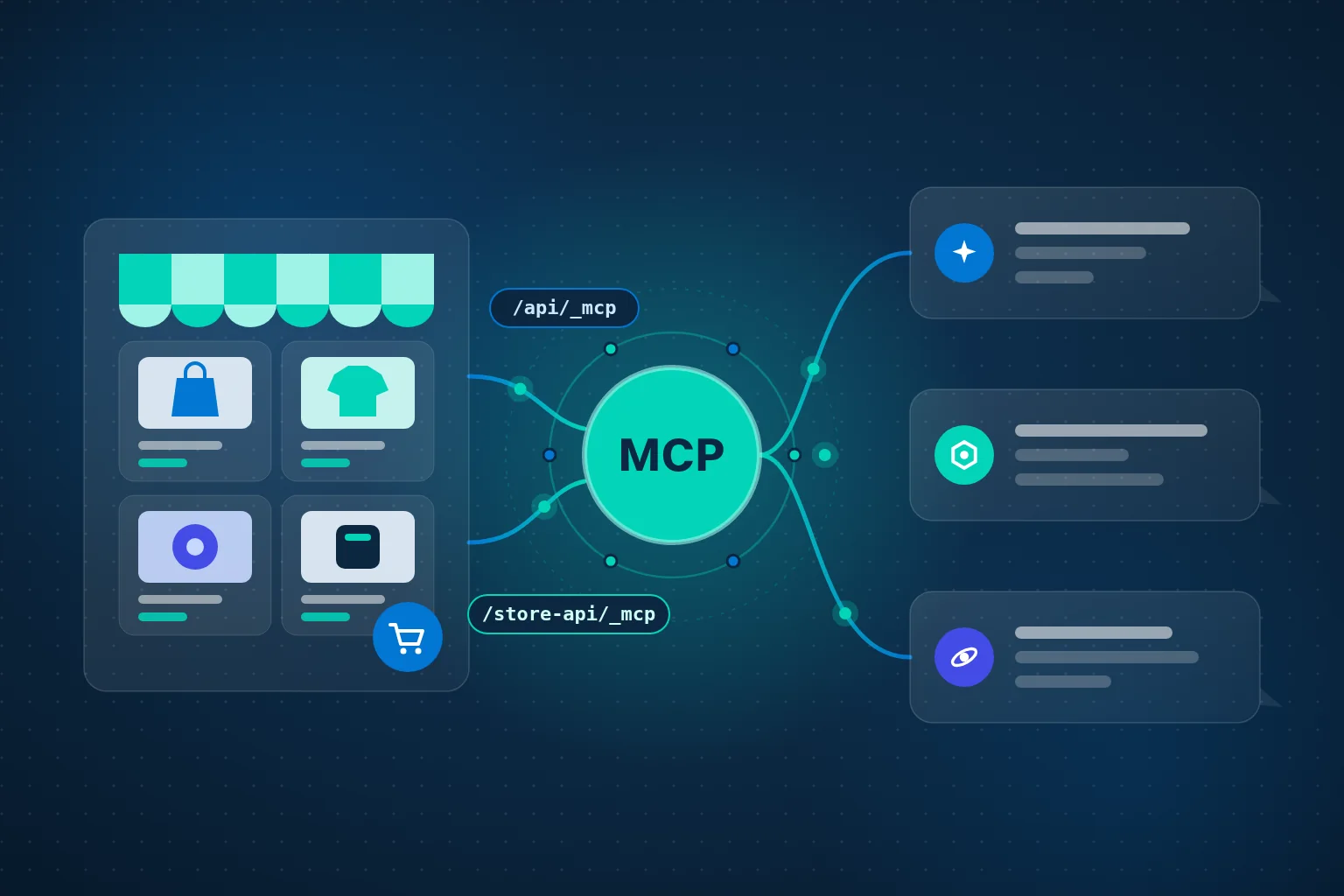
/api/_mcp – back-office access via the Admin API: products, orders, settings and media. Permissions follow Shopware's access control lists (ACL).
/store-api/_mcp – access from a shopper's perspective in a sales channel. According to the Shopware documentation, it's meant for agents that browse a shop and work with the same data the storefront shows.
The native MCP server provides two endpoints. The integration, ACL role and MCP allowlist control what the AI can see.
Integrations, roles and allowlists
Authentication works through a Shopware integration. You get an access key and a secret, which the AI client sends as HTTP headers (sw-access-key and sw-secret-access-key). These credentials don't expire as long as the integration exists. Admin API bearer tokens also work, but they expire after ten minutes by default.
Three points matter most for security:
A dedicated role instead of full access. Shopware's docs show the setup with admin rights, but explicitly recommend a dedicated ACL role with only the necessary permissions for production use.
MCP allowlist. Under Settings → Integrations, you define per integration which tools, resources and prompts the AI may use at all. Individual users have their own allowlist.
Rate limiting. According to the configuration docs, both endpoints have their own limits to protect against brute-force attempts and runaway agent loops.
What "experimental" means
Still experimental
Shopware labels the MCP server experimental until version 6.8. Tool names and payloads may still change. In practice, that means: start in a test environment, allow read-only tools first, and briefly check after Shopware updates that everything still works as expected.
Whichever AI assistant you connect, the setup always follows the same process:
The recommended process – from update to production.
Step by step: connecting Claude to Shopware
Claude currently offers the most direct route. The reason: its "custom connectors" let you store fixed credentials as request headers, which is exactly how Shopware's MCP server authenticates. According to Anthropic, custom connectors are available on the Free (one connector), Pro, Max, Team and Enterprise plans.
On a Pro or Max plan:
In Shopware, create an integration with a restricted role and set the MCP allowlist.
In Claude, open Customize → Connectors, click "+ Add", then "Add custom connector".
Enter a name and your shop's URL, for example https://your-shop.com/api/_mcp.
Review the detected authentication settings and choose "No sign in" if needed.
Under "Request headers", add the values for sw-access-key and sw-secret-access-key.
Click "Add". In a chat, enable the connector via "+" → Connectors.
On Team and Enterprise plans, owners add the connector under Organization settings → Connectors. Members then connect individually.
Good to know
Claude connects from Anthropic's cloud, not from your computer. Your shop must therefore be publicly reachable. Behind a firewall, you need to allowlist Anthropic's IP addresses.
When a team shares a fixed key, every user has the same permissions. Keep the integration's role especially narrow.
For developers, the Shopware docs also describe local setup in Claude Desktop (via the claude_desktop_config.json file) and in Claude Code.
ChatGPT and Shopware: two routes and an honest caveat
With ChatGPT, it's worth separating two goals: working with shop data, and making products visible in ChatGPT.
Open chatgpt.com/plugins, click the plus button, then "Add custom MCP server".
Enter a name and description, and the server's public HTTPS URL, or choose a Secure MCP Tunnel.
Configure authentication, confirm the risk warning and select "Create as a plugin".
What's available depends on your plan and your workspace policies. In Business and Enterprise workspaces, admins enable this capability.
The honest caveat
For protected MCP servers, OpenAI relies on an OAuth 2.1 sign-in flow following the MCP specification. Shopware's MCP server, however, expects integration keys in headers or short-lived API tokens. In our assessment, ChatGPT therefore usually needs a secure layer in between that handles the OAuth sign-in. We haven't found an off-the-shelf solution for this from Shopware or OpenAI, so plan for some development effort.
For developer teams, there's a shortcut: OpenAI's coding agent Codex is documented in Shopware's docs with a ready-made configuration. Via the OpenAI API, MCP servers can also be used as tools in your own applications.
Route 2: Make your products visible in ChatGPT (Agentic Commerce)
With Shopware's free "Agentic Commerce" extension, you create a dedicated sales channel from the OpenAI template. There, you map properties such as colour, size or material, add a mandatory URL for your return policy, and generate a JSONL product feed. You submit the feed URL at chatgpt.com/merchants. It must be publicly accessible without authentication.
Two limitations for merchants in Europe
According to Shopware, registration for the ChatGPT marketplace is currently only available in the US and not in Europe.
OpenAI ended native "Instant Checkout" in ChatGPT in March 2026, as CNBC among others reported. Since then, purchases happen in the merchant's own shop.
Preparing the feed is still worthwhile. You need clean product data and property mappings anyway, and the same extension also provides a Google product feed.
Connecting Grok to Shopware
In the Grok app
According to the xAI documentation, connectors are available to all Grok users. You add your own MCP server like this:
Open grok.com/connectors.
Click "New Connector" and select "Custom".
Enter the MCP server URL and complete any required authentication.
Grok then discovers the available tools automatically. On Grok Business and Enterprise, a team admin must first provision the connector in the cloud console. Here, too, the server must be publicly reachable.
Via the xAI API
For your own automations, the xAI API offers "Remote MCP Tools". You specify the server URL and can send additional headers, including your Shopware credentials. With the allowed_tools parameter, you expose only specific tools. That matters because the xAI API doesn't currently support the require_approval parameter, so there's no built-in confirmation step.
Our recommendation
Allow only read-only tools via the API to begin with.
ChatGPT, Claude and Grok compared
All three assistants speak MCP. The main difference is authentication, and with it the setup effort:
Claude
ChatGPT
Grok
Setup
Customize → Connectors → "Add custom connector"
chatgpt.com/plugins → "Add custom MCP server"
grok.com/connectors → "New Connector" → "Custom", or the xAI API
Authentication
Fixed credentials as request headers
OAuth 2.1 per the MCP specification
App: depends on the server; API: additional headers possible
Shopware keys usable directly?
Yes
Usually not – needs an OAuth layer
Yes, via the xAI API
Availability
Free (1 connector), Pro, Max, Team, Enterprise
Depends on plan and workspace; Business/Enterprise: enabled by admins
Connectors for all users; Business/Enterprise: admin provisions
Effort
Low
Medium (development)
Low to medium
Deepware assessment, as of October 2026. Sources: Anthropic, OpenAI and xAI documentation.
Shopware Copilot and the Agentic Commerce extension
Shopware Copilot: AI right inside the Administration
If you don't want to connect an external assistant, you can use Shopware Copilot. It answers questions about Shopware features on all plans. With "Data Insights", it delivers numbers and charts on customers, orders and shop performance. With "Copilot Agentic", it carries out tasks such as discount campaigns, flows or bulk product updates. Changes are prepared as drafts and only applied once you confirm them.
With Shopware 6.7.15.0, Copilot Agentic moved from beta to stable, according to the October 2026 release news. Copilot can now be assigned to specific ACL roles, and apps and plugins can make their capabilities available to Copilot via MCP. The advanced features require a Shopware Intelligence+ subscription.
Agentic Commerce: product feeds and UCP
The "Agentic Commerce" extension (beta) has two building blocks:
Product feed sales channel: feeds for OpenAI and Google, with tracking of orders, new customers and revenue from AI channels via affiliate and campaign codes.
Universal Commerce Protocol (UCP): an open protocol that lets AI agents discover your shop, browse the catalogue and buy on a shopper's behalf. You enable it per sales channel and define what agents may do: browse the catalogue, use the cart, apply discounts, check out and read order status. Available transports are REST, A2A, Embedded and MCP.
AI chatbots from the Shopware Store
If you mainly want to use AI for your customers in the storefront, a chatbot plugin is often the faster route. Two examples from the Shopware Store:
All-in-One AI Shop Assistant by Biloba IT: customer guidance in the storefront, product and SEO copy, and image alt texts. You can choose between ChatGPT, Gemini, Claude and Mistral, and it also offers MCP integration and AI labelling in the chat.
NextGen OpenAI Chatbot und Support Agent by 5 Elements Websolutions: 24/7 support and natural-language product search based on live shop data, managed via a free Agents Manager in the back end.
When choosing, check compatibility with your Shopware version, consent and deletion features, and the AI provider's ongoing API costs.
Mind the liability
Biloba IT itself points out in its store listing that shop operators are liable for their chatbot's statements just as for their own business actions.
Checklist: security and data protection
Create a separate integration per application – never use an employee's admin credentials.
Assign an ACL role with minimal permissions instead of full access.
Maintain the MCP allowlist and start with read-only tools.
Test in a staging environment before connecting the live shop.
Always review write actions – use previews and approval dialogs.
Protect credentials: never commit configuration files containing keys to version control.
Plan public reachability deliberately: cloud assistants connect from outside, so review firewall rules and rate limits.
Clarify data protection: which personal data (such as customer and order data) reaches the AI provider? Review data processing agreements and document the data flows.
Be transparent with customers: label storefront AI chatbots as such and obtain consent properly.
Check after updates: the MCP server is experimental until Shopware 6.8, so tools may change.
Frequently asked questions (FAQ)
Which Shopware version do I need?
The MCP server is available from Shopware 6.7.11.0 (with a feature flag). We recommend at least 6.7.14.0, where it's enabled by default and supports progressive tool discovery.
Is the MCP server suitable for a live shop?
It's labelled experimental until Shopware 6.8. With a narrowly scoped role, an allowlist, read-only tools to start with and prior testing on staging, the risk can be kept well under control.
Which AI assistant is easiest to connect?
Currently Claude, because your Shopware credentials can be stored directly as request headers in a custom connector. With ChatGPT, the OAuth requirement usually calls for a layer in between.
Can customers buy from me directly in ChatGPT?
Not at the moment. OpenAI ended Instant Checkout in March 2026, and according to Shopware, merchant registration for the ChatGPT marketplace is currently only available in the US. With UCP, however, Shopware already offers an open protocol through which compatible AI agents can complete a checkout.
Does my shop need to be publicly reachable?
For the cloud versions of Claude, ChatGPT and Grok, yes, since they connect from their own servers. For private servers, OpenAI offers Secure MCP Tunnel, and xAI documents tunnelling options. For Claude, you may need to allowlist Anthropic's IP addresses.
What does an AI connection cost?
That depends on the route: your plan with the AI provider, possibly Shopware Intelligence+ or plugin subscriptions, and the setup effort. You'll get a concrete estimate for your shop in a free initial consultation.
Request an individual consultation
Every shop is different. Which Shopware version you run, what data the AI may see, and whether you want to become more efficient internally or more visible externally all determine the right route.
As a Shopware Bronze Partner based in Munich, Deepware supports merchants across Germany, Austria and Switzerland with exactly these questions:
1Updating to an MCP-capable Shopware version
2Roles, allowlists and securing the interface
3Connecting Claude, ChatGPT, Grok or Shopware Copilot, including an OAuth layer for ChatGPT
4Preparing Agentic Commerce feeds and UCP
5Choosing and setting up the right storefront chatbot
Tell us briefly about your situation: click “Contact us” and fill in the short form. We'll get back to you personally. The initial consultation is free and non-binding.
Frage ein Projekt über das Formular an und wir prüfen und melden uns schnellstmöglich. Für individuelle Anfragen sende uns eine E-Mail an info@deepware.org.
Danke für deine Anfrage! Wir prüfen deine angaben und werden uns so schnell wie möglich bei dir melden :)
Connect Shopware to ChatGPT, Claude and Grok: The Practical Guide 2026
Your customers research products with ChatGPT, Claude or Grok. Your team can use the same assistants to work with your own shop data: checking stock, finding missing product descriptions, adjusting prices. Shopware now ships its own interface for this, right in the core. In this guide, we show how the connection works today, where the limits are, and what to watch out for in terms of security and data protection.
All information reflects the state of October 2026 and links to the official sources.
Key takeaways
Shopware ships its own MCP server in the core: introduced in 6.7.11, always enabled from version 6.7.14.0.
Two endpoints: /api/_mcp for the back office and /store-api/_mcp for the shopper view.
Claude is the easiest to connect. ChatGPT usually needs a layer in between because of OAuth. Grok works via connectors or the xAI API.
Security first: a dedicated ACL role, the MCP allowlist, read-only tools to start with and a test on staging.
Buying directly in ChatGPT isn't possible at the moment. Agentic Commerce and UCP still prepare your shop for AI shopping.
10 min read · As of October 2026
Why connect your Shopware shop to AI assistants?
An AI connection gives you two quite different benefits.
1. Internal: work faster with real shop data. Instead of exporting data and filtering spreadsheets, you ask your question directly in the chat. The Shopware documentation itself gives examples such as:
"Find products with stock below five units."
"Find all active products without descriptions."
"Generate SEO-friendly meta titles for the products in a category."
"Increase prices of products in a specific category by 5%. Show a preview before applying the changes."
2. External: become discoverable in AI shopping. AI assistants are increasingly used for product search. With the "Agentic Commerce" extension, Shopware provides product feeds and an open protocol so that AI platforms and AI agents can find and process your catalogue.
On top of that, Shopware Copilot works directly inside the Administration. We cover all three routes below.
How it works: Shopware's MCP server
What is MCP?
The Model Context Protocol (MCP) is an open standard that lets AI applications work with external systems. Instead of copying data out of a chat window, an assistant calls defined tools, such as a product search, and receives structured results. ChatGPT, Claude and Grok all support MCP.
Shopware's native MCP server
Shopware ships a native MCP server in its core. It was introduced in version 6.7.11.0 behind the MCP_SERVER feature flag. From version 6.7.14.0, the flag is gone and the server is always enabled. That release also added "progressive tool discovery": an AI client initially sees only a few discovery tools and enables the toolsets it needs on demand.
Two endpoints: Admin API and Store API
/api/_mcp – back-office access via the Admin API: products, orders, settings and media. Permissions follow Shopware's access control lists (ACL).
/store-api/_mcp – access from a shopper's perspective in a sales channel. According to the Shopware documentation, it's meant for agents that browse a shop and work with the same data the storefront shows.
The native MCP server provides two endpoints. The integration, ACL role and MCP allowlist control what the AI can see.
Integrations, roles and allowlists
Authentication works through a Shopware integration. You get an access key and a secret, which the AI client sends as HTTP headers (sw-access-key and sw-secret-access-key). These credentials don't expire as long as the integration exists. Admin API bearer tokens also work, but they expire after ten minutes by default.
Three points matter most for security:
A dedicated role instead of full access. Shopware's docs show the setup with admin rights, but explicitly recommend a dedicated ACL role with only the necessary permissions for production use.
MCP allowlist. Under Settings → Integrations, you define per integration which tools, resources and prompts the AI may use at all. Individual users have their own allowlist.
Rate limiting. According to the configuration docs, both endpoints have their own limits to protect against brute-force attempts and runaway agent loops.
What "experimental" means
Still experimental
Shopware labels the MCP server experimental until version 6.8. Tool names and payloads may still change. In practice, that means: start in a test environment, allow read-only tools first, and briefly check after Shopware updates that everything still works as expected.
Whichever AI assistant you connect, the setup always follows the same process:
The recommended process – from update to production.
Step by step: connecting Claude to Shopware
Claude currently offers the most direct route. The reason: its "custom connectors" let you store fixed credentials as request headers, which is exactly how Shopware's MCP server authenticates. According to Anthropic, custom connectors are available on the Free (one connector), Pro, Max, Team and Enterprise plans.
On a Pro or Max plan:
In Shopware, create an integration with a restricted role and set the MCP allowlist.
In Claude, open Customize → Connectors, click "+ Add", then "Add custom connector".
Enter a name and your shop's URL, for example https://your-shop.com/api/_mcp.
Review the detected authentication settings and choose "No sign in" if needed.
Under "Request headers", add the values for sw-access-key and sw-secret-access-key.
Click "Add". In a chat, enable the connector via "+" → Connectors.
On Team and Enterprise plans, owners add the connector under Organization settings → Connectors. Members then connect individually.
Good to know
Claude connects from Anthropic's cloud, not from your computer. Your shop must therefore be publicly reachable. Behind a firewall, you need to allowlist Anthropic's IP addresses.
When a team shares a fixed key, every user has the same permissions. Keep the integration's role especially narrow.
For developers, the Shopware docs also describe local setup in Claude Desktop (via the claude_desktop_config.json file) and in Claude Code.
ChatGPT and Shopware: two routes and an honest caveat
With ChatGPT, it's worth separating two goals: working with shop data, and making products visible in ChatGPT.
Open chatgpt.com/plugins, click the plus button, then "Add custom MCP server".
Enter a name and description, and the server's public HTTPS URL, or choose a Secure MCP Tunnel.
Configure authentication, confirm the risk warning and select "Create as a plugin".
What's available depends on your plan and your workspace policies. In Business and Enterprise workspaces, admins enable this capability.
The honest caveat
For protected MCP servers, OpenAI relies on an OAuth 2.1 sign-in flow following the MCP specification. Shopware's MCP server, however, expects integration keys in headers or short-lived API tokens. In our assessment, ChatGPT therefore usually needs a secure layer in between that handles the OAuth sign-in. We haven't found an off-the-shelf solution for this from Shopware or OpenAI, so plan for some development effort.
For developer teams, there's a shortcut: OpenAI's coding agent Codex is documented in Shopware's docs with a ready-made configuration. Via the OpenAI API, MCP servers can also be used as tools in your own applications.
Route 2: Make your products visible in ChatGPT (Agentic Commerce)
With Shopware's free "Agentic Commerce" extension, you create a dedicated sales channel from the OpenAI template. There, you map properties such as colour, size or material, add a mandatory URL for your return policy, and generate a JSONL product feed. You submit the feed URL at chatgpt.com/merchants. It must be publicly accessible without authentication.
Two limitations for merchants in Europe
According to Shopware, registration for the ChatGPT marketplace is currently only available in the US and not in Europe.
OpenAI ended native "Instant Checkout" in ChatGPT in March 2026, as CNBC among others reported. Since then, purchases happen in the merchant's own shop.
Preparing the feed is still worthwhile. You need clean product data and property mappings anyway, and the same extension also provides a Google product feed.
Connecting Grok to Shopware
In the Grok app
According to the xAI documentation, connectors are available to all Grok users. You add your own MCP server like this:
Open grok.com/connectors.
Click "New Connector" and select "Custom".
Enter the MCP server URL and complete any required authentication.
Grok then discovers the available tools automatically. On Grok Business and Enterprise, a team admin must first provision the connector in the cloud console. Here, too, the server must be publicly reachable.
Via the xAI API
For your own automations, the xAI API offers "Remote MCP Tools". You specify the server URL and can send additional headers, including your Shopware credentials. With the allowed_tools parameter, you expose only specific tools. That matters because the xAI API doesn't currently support the require_approval parameter, so there's no built-in confirmation step.
Our recommendation
Allow only read-only tools via the API to begin with.
ChatGPT, Claude and Grok compared
All three assistants speak MCP. The main difference is authentication, and with it the setup effort:
Claude
ChatGPT
Grok
Setup
Customize → Connectors → "Add custom connector"
chatgpt.com/plugins → "Add custom MCP server"
grok.com/connectors → "New Connector" → "Custom", or the xAI API
Authentication
Fixed credentials as request headers
OAuth 2.1 per the MCP specification
App: depends on the server; API: additional headers possible
Shopware keys usable directly?
Yes
Usually not – needs an OAuth layer
Yes, via the xAI API
Availability
Free (1 connector), Pro, Max, Team, Enterprise
Depends on plan and workspace; Business/Enterprise: enabled by admins
Connectors for all users; Business/Enterprise: admin provisions
Effort
Low
Medium (development)
Low to medium
Deepware assessment, as of October 2026. Sources: Anthropic, OpenAI and xAI documentation.
Shopware Copilot and the Agentic Commerce extension
Shopware Copilot: AI right inside the Administration
If you don't want to connect an external assistant, you can use Shopware Copilot. It answers questions about Shopware features on all plans. With "Data Insights", it delivers numbers and charts on customers, orders and shop performance. With "Copilot Agentic", it carries out tasks such as discount campaigns, flows or bulk product updates. Changes are prepared as drafts and only applied once you confirm them.
With Shopware 6.7.15.0, Copilot Agentic moved from beta to stable, according to the October 2026 release news. Copilot can now be assigned to specific ACL roles, and apps and plugins can make their capabilities available to Copilot via MCP. The advanced features require a Shopware Intelligence+ subscription.
Agentic Commerce: product feeds and UCP
The "Agentic Commerce" extension (beta) has two building blocks:
Product feed sales channel: feeds for OpenAI and Google, with tracking of orders, new customers and revenue from AI channels via affiliate and campaign codes.
Universal Commerce Protocol (UCP): an open protocol that lets AI agents discover your shop, browse the catalogue and buy on a shopper's behalf. You enable it per sales channel and define what agents may do: browse the catalogue, use the cart, apply discounts, check out and read order status. Available transports are REST, A2A, Embedded and MCP.
AI chatbots from the Shopware Store
If you mainly want to use AI for your customers in the storefront, a chatbot plugin is often the faster route. Two examples from the Shopware Store:
All-in-One AI Shop Assistant by Biloba IT: customer guidance in the storefront, product and SEO copy, and image alt texts. You can choose between ChatGPT, Gemini, Claude and Mistral, and it also offers MCP integration and AI labelling in the chat.
NextGen OpenAI Chatbot und Support Agent by 5 Elements Websolutions: 24/7 support and natural-language product search based on live shop data, managed via a free Agents Manager in the back end.
When choosing, check compatibility with your Shopware version, consent and deletion features, and the AI provider's ongoing API costs.
Mind the liability
Biloba IT itself points out in its store listing that shop operators are liable for their chatbot's statements just as for their own business actions.
Checklist: security and data protection
Create a separate integration per application – never use an employee's admin credentials.
Assign an ACL role with minimal permissions instead of full access.
Maintain the MCP allowlist and start with read-only tools.
Test in a staging environment before connecting the live shop.
Always review write actions – use previews and approval dialogs.
Protect credentials: never commit configuration files containing keys to version control.
Plan public reachability deliberately: cloud assistants connect from outside, so review firewall rules and rate limits.
Clarify data protection: which personal data (such as customer and order data) reaches the AI provider? Review data processing agreements and document the data flows.
Be transparent with customers: label storefront AI chatbots as such and obtain consent properly.
Check after updates: the MCP server is experimental until Shopware 6.8, so tools may change.
Frequently asked questions (FAQ)
Which Shopware version do I need?
The MCP server is available from Shopware 6.7.11.0 (with a feature flag). We recommend at least 6.7.14.0, where it's enabled by default and supports progressive tool discovery.
Is the MCP server suitable for a live shop?
It's labelled experimental until Shopware 6.8. With a narrowly scoped role, an allowlist, read-only tools to start with and prior testing on staging, the risk can be kept well under control.
Which AI assistant is easiest to connect?
Currently Claude, because your Shopware credentials can be stored directly as request headers in a custom connector. With ChatGPT, the OAuth requirement usually calls for a layer in between.
Can customers buy from me directly in ChatGPT?
Not at the moment. OpenAI ended Instant Checkout in March 2026, and according to Shopware, merchant registration for the ChatGPT marketplace is currently only available in the US. With UCP, however, Shopware already offers an open protocol through which compatible AI agents can complete a checkout.
Does my shop need to be publicly reachable?
For the cloud versions of Claude, ChatGPT and Grok, yes, since they connect from their own servers. For private servers, OpenAI offers Secure MCP Tunnel, and xAI documents tunnelling options. For Claude, you may need to allowlist Anthropic's IP addresses.
What does an AI connection cost?
That depends on the route: your plan with the AI provider, possibly Shopware Intelligence+ or plugin subscriptions, and the setup effort. You'll get a concrete estimate for your shop in a free initial consultation.
Request an individual consultation
Every shop is different. Which Shopware version you run, what data the AI may see, and whether you want to become more efficient internally or more visible externally all determine the right route.
As a Shopware Bronze Partner based in Munich, Deepware supports merchants across Germany, Austria and Switzerland with exactly these questions:
1Updating to an MCP-capable Shopware version
2Roles, allowlists and securing the interface
3Connecting Claude, ChatGPT, Grok or Shopware Copilot, including an OAuth layer for ChatGPT
4Preparing Agentic Commerce feeds and UCP
5Choosing and setting up the right storefront chatbot
Tell us briefly about your situation: click “Contact us” and fill in the short form. We'll get back to you personally. The initial consultation is free and non-binding.
Revolutionizing Large Language Models with Mixture-of-Experts Architecture
In the rapidly evolving landscape of artificial intelligence, Tencent has unveiled a game-changing innovation: Hunyuan A13B. This open-source large language model represents a paradigm shift in how we approach AI efficiency, combining the power of 80 billion parameters with the computational efficiency of just 13 billion active parameters through its revolutionary Mixture-of-Experts (MoE) architecture.
Key Innovation: Hunyuan A13B achieves state-of-the-art performance while using significantly fewer computational resources than traditional large language models, making advanced AI accessible to a broader range of developers and organizations.
Technical Specifications
80b
Total Parameters
13B
Active Parameters
256k
Context Length
MoE
Architecture
64 + 1
Experts
128k
Vocabulary Size
The model employs a sophisticated fine-grained MoE architecture with one shared expert and 64 non-shared experts, activating 8 experts per forward pass. It features 32 layers, SwiGLU activations, and Grouped Query Attention (GQA) for efficient memory utilization.
Unique Selling Propositions
Dual-Mode Reasoning
Revolutionary Chain-of-Thought (CoT) capability with two distinct modes:
Fast-thinking mode: Low-latency responses for routine queries
Slow-thinking mode: Deep reasoning for complex multi-step problems
Superior Efficiency
Revolutionary Chain-of-Thought (CoT) capability with two distinct modes:
Resource Optimization: 80B total parameters with only 13B active
Stable Performance: Maintains coherence across extended inputs
Open Source Advantage
Full accessibility under Apache 2.0 license
Customizable: Modify and fine-tune for specific needs
Community Driven: Collaborative development and improvement
Performance Comparison
Models
Hunyuan A13B
Qwen3-A22B
DeepSeek R1
GPT-4o
Claude 3.5 Sonnet
parameters
80B (13B active)
22B active
236B
~1.76T
Unknown
context length
256K
128K
128K
128K
200K
BBH score
89.1
87.5
85.8
92.3
91.8
MBPP score
83.9
80.2
78.6
87.1
85.4
open source
yES
yES
yES
NO
NO
Specifications
veo 2
veo 3
Improvement
Video Resolution
720p
1080p HD
+33% pixels
Audio Integration
None
Native Audio
Revolutionary
Prompt Adherence
Good
Excellent
Significantly Improved
Character Consistency
Basic
Advanced
Modular Control
Generation Speed
2-3 minutes
1-2 minutes
50% faster
Benchmark Performance Visualization
BBH (Logic)
89.1
MBBP (Code)
83.9
Zebralogic
84.7
BFCL-v3
78.3
Complexfuncbench
61.2
Key Use Cases
Competitive Advantages
Key Differentiators
Efficiency leader: Best-in-class performance per parameter ratio
Accessibility: Open-source model vs. proprietary competitors
Innovation: First to implement dual-mode reasoning effectively
Scale: Largest context window in its parameter class
Efficiency Comparison
(Performance per Billion Parameters)
Hunyuan A13B
6.85
Qwen3-A22B
3.98
DeepSeek R1
0.36
Future Implications
Hunyuan A13B represents a significant step forward in democratizing AI technology. Its efficient architecture and open-source nature are likely to:
Democratize AI Access
Lower computational requirements make advanced AI accessible to smaller organizations and individual developers.
Accelerate Research
Open-source availability enables rapid innovation and customization for specific research domains.
Reduce Costs
Improved efficiency translates to lower operational costs for AI deployment at scale.
Drive Innovation
The MoE architecture and dual-mode reasoning may inspire new approaches to AI model design.
feature
Free Plan
AI Pro ($20/month)
AI Ultra ($249/month)
Veo 3 Access
Limited
Key features
full access
Monthly Generations
10
100
unlimited*
Audio Generation
basic
advanced
Flow Tool Access
Advanced
premium
Early Features
Hunyuan A13B stands as a testament to the power of innovative architecture in AI development. By combining the efficiency of Mixture-of-Experts with dual-mode reasoning and a massive context window, Tencent has created a model that challenges the conventional wisdom that bigger always means better.
For organizations looking to implement advanced AI capabilities without the computational overhead of traditional large language models, Hunyuan A13B offers a compelling solution. Its open-source nature, combined with state-of-the-art performance, positions it as a game-changer in the AI landscape.
Ready To Get Started? Hunyuan A13B is available now on Hugging Face and can be deployed using popular frameworks like Transformers. Join the growing community of developers leveraging this powerful model for innovative AI applications.
Transforming Text into Cinematic Reality with Native Audio Integration
The Next Frontier of AI Video Generation
In May 2025, Google DeepMind unveiled Veo 3, a groundbreaking AI video generation model that has fundamentally changed how we think about artificial content creation. This state-of-the-art system doesn't just generate videos—it creates complete audiovisual experiences that blur the line between AI-generated content and reality.
Breaking News: Released just weeks ago, Veo 3 is already flooding social media with content so convincing that many believe this is the moment we stop being able to distinguish between real and AI-generated videos.
Key Statistics & Performance Metrics
1080p
Video Resolution
60s
Maximum Duration
100
Monthly Generations (Pro)
$249
Google AI Ultra Plan
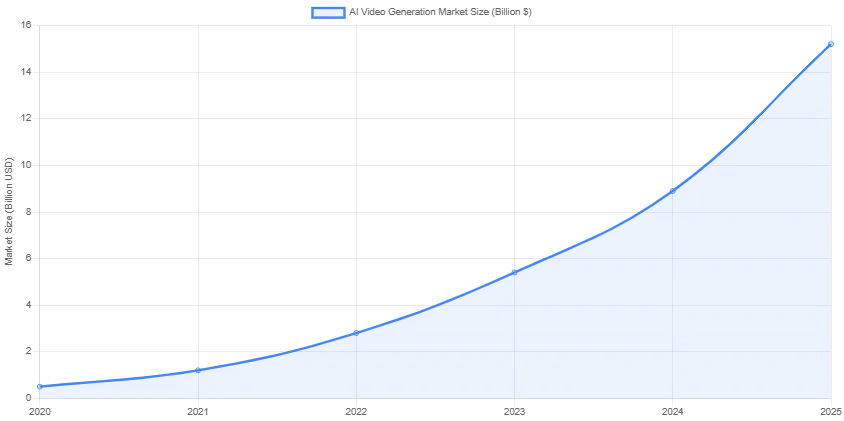
AI Video Generation Market Evolution
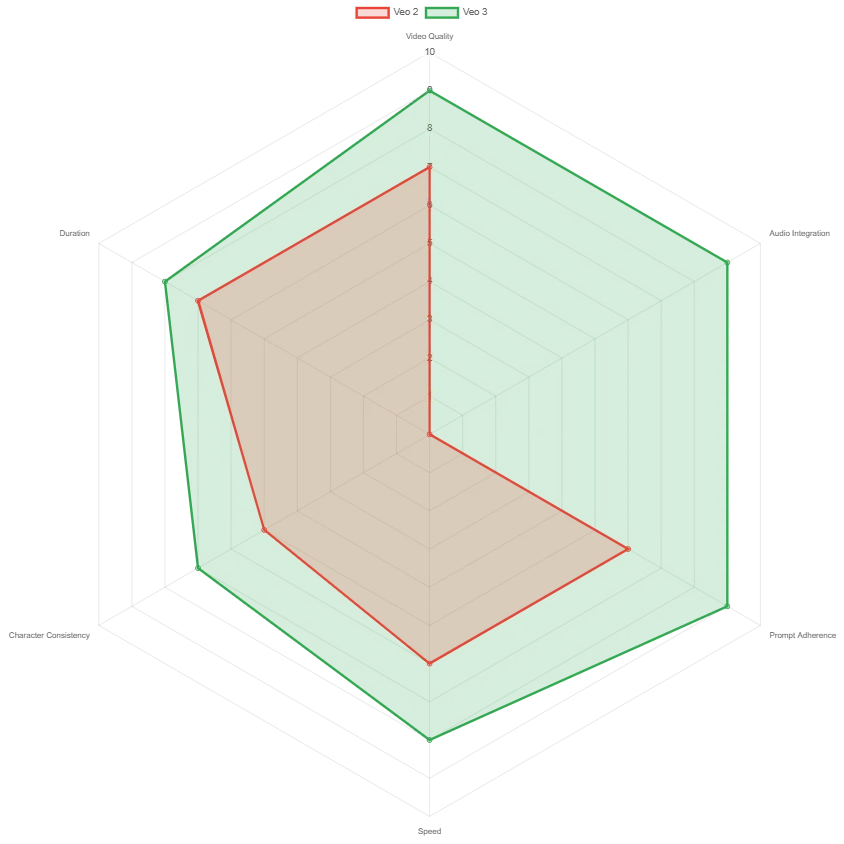
Veo Model Comparison: Key Capabilities
Revolutionary Features
Native Audio Integration
First-of-its-kind capability to generate synchronized dialogue, ambient sounds, and background music directly within video creation. Traffic noises, birds singing, character conversations—all generated seamlessly.
Cinematic Quality
Produces high-definition videos with improved prompt adherence, following complex series of actions and scenes with remarkable accuracy and cinematic quality.
Zero-Shot Generation
Excels at generating videos without prior training on specific scenes, yet outputs match professional cinematic expectations through advanced transformer architecture.
Modular Control
Advanced "Ingredients" feature allows precise control over individual elements, maintaining character consistency across different shots and scenes.
Multi-Platform Integration
Available through Gemini AI, Vertex AI, and Google's new Flow filmmaking tool, with API access for developers and enterprise users.
Built-in Safety
Includes watermarking technology and safety filters to identify AI-generated content and prevent misuse, addressing concerns about deepfakes and misinformation.
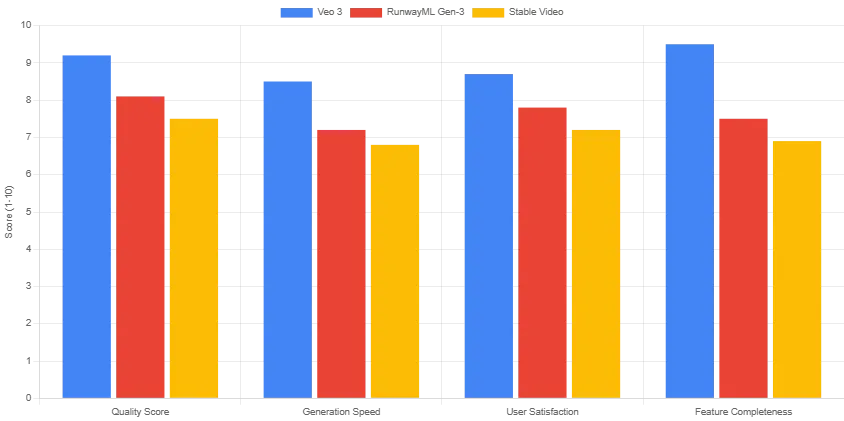
Performance Benchmarks: Veo 3 vs Competitors
Technical Specifications
Specifications
veo 2
veo 3
Improvement
Video Resolution
720p
1080p HD
+33% pixels
Audio Integration
None
Native Audio
Revolutionary
Prompt Adherence
Good
Excellent
Significantly Improved
Character Consistency
Basic
Advanced
Modular Control
Generation Speed
2-3 minutes
1-2 minutes
50% faster
Specifications
veo 2
veo 3
Improvement
Video Resolution
720p
1080p HD
+33% pixels
Audio Integration
None
Native Audio
Revolutionary
Prompt Adherence
Good
Excellent
Significantly Improved
Character Consistency
Basic
Advanced
Modular Control
Generation Speed
2-3 minutes
1-2 minutes
50% faster
Development Timeline
May 2024
Veo 2 Release
Google DeepMind releases Veo 2 with improved video quality and longer duration capabilities.
May 14, 2025
Google I/O 2025 Announcement
Veo 3 officially announced at Google I/O with native audio integration as the headline feature.
May 20, 2025
Public Launch
Veo 3 launches to users through Gemini AI Ultra plan, initially available in the United States.
May 23, 2025
Flow Integration
Google introduces Flow, a dedicated AI filmmaking tool built specifically for Veo 3.
June 2025
Global Expansion
Veo 3 expands to UK and mobile platforms, with plans for broader international availability.
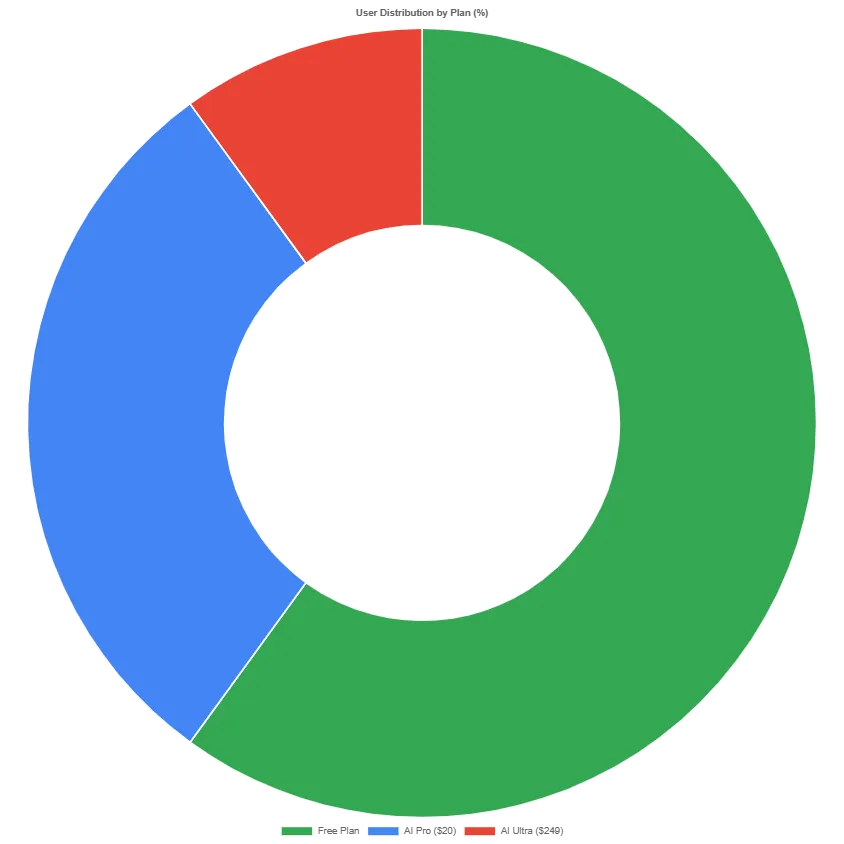
Google AI Plan Comparison
Plan Details
feature
Free Plan
AI Pro ($20/month)
AI Ultra ($249/month)
Veo 3 Access
Limited
Key features
full access
Monthly Generations
10
100
unlimited*
Audio Generation
basic
advanced
Flow Tool Access
Advanced
premium
Early Features
feature
Free Plan
AI Pro ($20/month)
AI Ultra ($249/month)
Veo 3 Access
Limited
Key features
full access
Monthly Generations
10
100
unlimited*
Audio Generation
basic
advanced
Flow Tool Access
Advanced
premium
Early Features
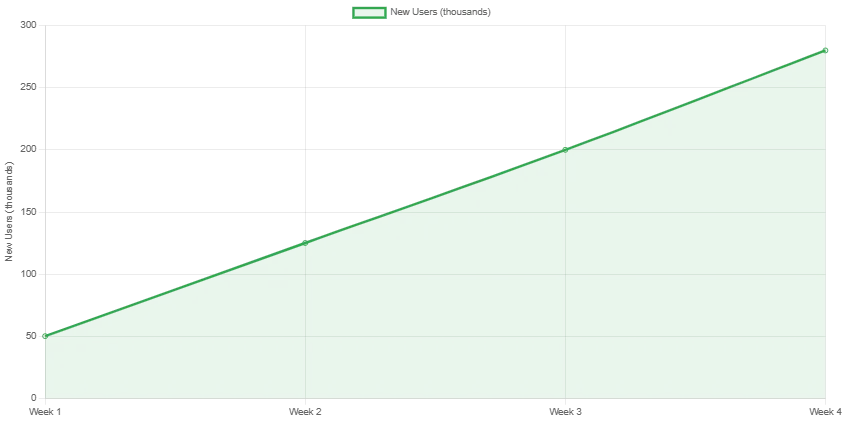
User Adoption Rate (First Month)
The response to Veo 3 has been unprecedented in the AI video generation space. Within just three weeks of launch, the tool has:
Generated over 1 million videos across all user tiers
Achieved 85% user satisfaction in early beta testing
Reduced video production costs by 70% for small content creators
Sparked industry-wide discussions about AI authenticity and regulation
Challenges and Limitations
Character Consistency
While improved, multi-character scenes can still feel stiff or repetitive, with character interactions sometimes lacking natural flow.
Duration Limitations
Longer or more intricate scenes can fall apart, with narrative coherence decreasing significantly after 30-40 seconds.
Geographic Restrictions
Currently limited to select markets (US, UK), with no timeline announced for global availability.
Cost Barrier
The $249/month Ultra plan creates a significant barrier for individual creators and small businesses.
Future Implications & Industry Impact
Veo 3 represents more than just a technological advancement—it signals a fundamental shift in content creation. The integration of native audio generation sets a new industry standard that competitors will struggle to match.
Predicted Industry Changes:
Content Creation Democratization: High-quality video production becomes accessible to non-professionals
Traditional Media Disruption: Lower barriers to entry challenge established production companies
Regulatory Response: Governments likely to introduce stricter AI content labeling requirements
Educational Revolution: Personalized video content transforms online learning
Marketing Evolution: Brands can create unlimited variations of video advertisements
Conclusion
Google Veo 3 isn't just an incremental improvement—it's a paradigm shift. By combining state-of-the-art video generation with native audio integration, Google has created a tool that doesn't just generate content; it creates experiences that challenge our understanding of what's real and what's artificial.
While challenges remain around cost, accessibility, and ethical implications, Veo 3 has undeniably set the new standard for AI video generation. As we move forward, the question isn't whether AI will transform video content creation—it's how quickly the industry will adapt to this new reality.
The future of video content creation is here, and it's more accessible, more powerful, and more realistic than ever before.
Most online stores have streamlined their ordering process to just one click. For years, however, the process of canceling an order has gone in the opposite direction: finding a form, typing an email, and waiting for a reply. The legislature is putting an end to this very imbalance—and it will happen soon.
With Directive (EU) 2023/2673, the European Union is amending the Consumer Rights Directive and introducing a mandatory digital withdrawal function. In Germany, it will be implemented through the new Section 356a of the Civil Code (BGB), which will take effect on June 19, 2026—across the EU, uniformly, and without a further transition period. Austria is implementing the same requirements through the Consumer Rights Directive Implementation Act.
To many companies, this sounds like a minor front-end issue. In practice, however, it affects the entire process—from the user interface to customer accounts, CRM, and ERP, all the way through to refunds and audit-proof documentation. Tackling this early on helps avoid a last-minute project under time pressure.
Why bother:
A Response to “Dark Patterns”
In recent years, European regulators have consistently taken action against contractual practices that pressure people into signing agreements while making it unnecessarily difficult for them to exercise their rights. Making a purchase takes seconds—but canceling it has become a test of patience. The new rule levels the playing field. Legal experts call this functional equivalence: The process of getting out of a contract must not be more complicated than the process of entering into it.
Anyone who can enter into a contract online should also be able to cancel it online.
Important to know: The law refers to a “cancellation function,” not literally to a “button.” In practice, this can be a clearly labeled button—or a prominently displayed link, as long as it is just as easy to find. What matters is not the form, but the accessibility.
Who is affected:
Much more than a traditional online store
Many merchants assume that the requirement applies only to pure online stores. The scope is broader: it applies to distance contracts for goods, services, and financial products concluded via an online user interface—that is, via websites as well as apps. Specifically, this includes, among other things:
E-Commerce & D2C
SaaS provider
Online courses
Coaching & Consulting
Subscription & Membership Models
Marketplaces
Digital Products
Booking & Reservations
And it's not just about where a company is headquartered. Providers outside the EU—such as those in Switzerland—are also affected as soon as they specifically target consumers within the European Union.
What Needs to Be Done
Four Requirements, One Process
A link to a PDF or a contact page isn't enough. What's expected is a seamless digital process—simple, transparent, and easy to follow.
1. Visible and permanently accessible
The feature must be easy to find and clearly labeled throughout the entire cancellation period—with no detours or hidden paths.
2. Fully digitally explainable
After clicking, the consumer can submit their cancellation electronically and directly—without having to make an additional phone call or create a customer account. Guest access is expressly provided for.
3. Automatically confirm receipt
The company must confirm receipt immediately—including the content of the statement as well as the date and time. An automated confirmation ensures transparency and serves as proof for both parties.
4. Document in an audit-proof manner
Timestamps, contract references, confirmation records, and process logs must be properly filed. In the event of a dispute or an audit, these are the very documents that will make the difference.
One point that is often overlooked: When the feature changes, the required text changes as well. The cancellation policy and privacy policy must be updated—the latter with regard to the newly collected data, its processing, and retention period.
The risk:
If you do nothing, the deadline is extended—by one year
Enforcement takes place at the member state level. In addition to complaints, cease-and-desist letters, antitrust proceedings, and potential fines, there is one particularly costly consequence that many underestimate:
12 months + 14 days
This is how long the cancellation period lasts if the feature is missing or if information about it is incorrect—instead of the usual 14 days.
Contracts could be rescinded for over a year—a significant commercial risk that can be easily avoided with proper implementation.
What Many Misjudge
We already have a cancellation form, don't we?
A form alone does not automatically meet the requirements for a fully functional digital cancellation feature that includes confirmation and documentation.
Unsere Kunden können uns einfach eine E-Mail schreiben.
Our customers can simply send us an email.
That's just a minor front-end adjustment.
In most cases, multiple systems are affected: the online store, customer accounts, CRM, ERP, payment and refund processes, and automated notifications.
Platform Location
Native function or custom integration?
As the deadline approaches, apps, plugins, and extensions are popping up everywhere. The situation varies depending on the system:
Shopify · usually through apps
WooCommerce · Flexible, Plugins
Shopware · First Extensions Now Available
Adobe Commerce / Magento
BigCommerce · PrestaShop
A native platform feature lowers the barrier to entry. But as soon as ERP and CRM integration, automated returns and refunds, custom business logic, multilingual workflows, audit trails, or existing customer portals come into play, a standard app quickly reaches its limits. Larger stores and custom solutions require integrations that fit seamlessly into their processes.
Even though some details of the national implementation are still being worked out, the essentials are clear: The “Cancel” button will be mandatory. It is not an isolated exception, but part of a broader trend toward greater transparency, consumer-friendliness, and digital standards in European commerce. Those who modernize their processes now will not only ensure compliance—but also create a better experience for their own customers.
Here's how Deepware helps
Not just a button. A robust process.
The task is not to incorporate a specific element, but to establish a revocation process that complies with the law and is technically sound. We will prepare your systems for the new requirements in a timely manner.
Analysis
We review your customer, return, and cancellation processes and identify compliance gaps.
Implementation
User-friendly solutions that combine regulatory compliance with customer experience.
Integration
Shopify, WooCommerce, Magento, Shopware, SaaS, and custom platforms.
Automation
Confirmations, audit trails, CRM/ERP integration, and secure storage.
Discuss implementation
Deepware provides support with analysis, planning, and technical implementation. For a legal assessment of your cancellation policy and privacy policy, we recommend consulting with your legal counsel—this article does not constitute legal advice.